Facebook Ads vs Meta Ads: Why Your Numbers Never Match and Which One to Trust
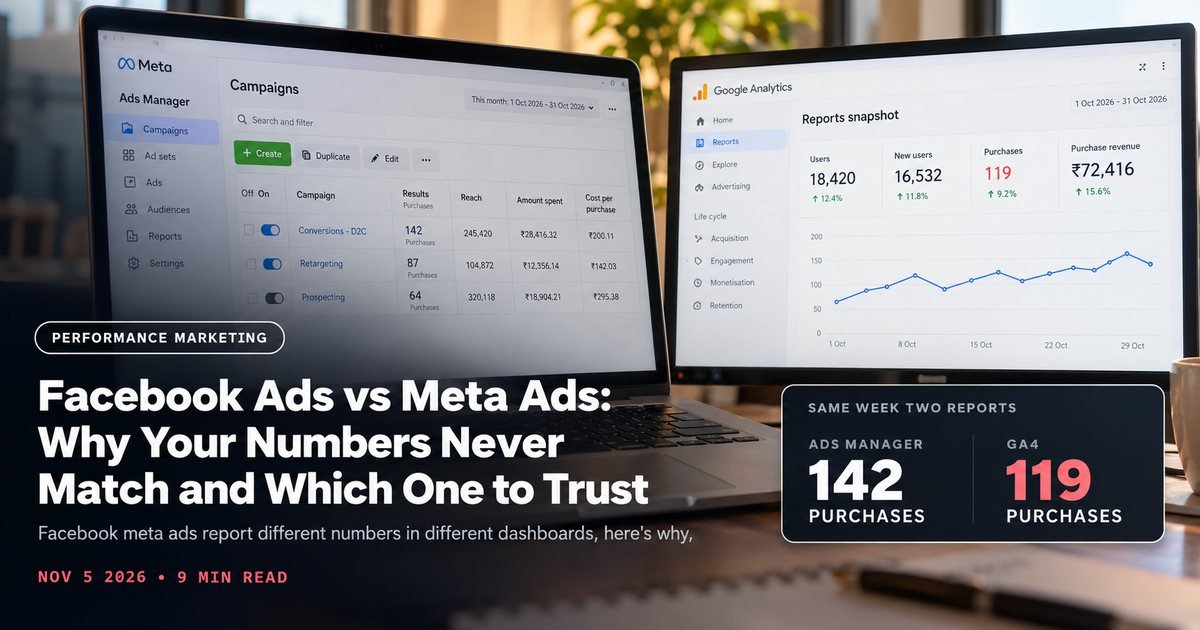
Facebook meta ads report different numbers in different dashboards. Here's why attribution windows and pixel setup cause the mismatch.
"Facebook ads" and "Meta ads" are the same thing. Meta is the company. Facebook and Instagram are the two apps where your facebook meta ads actually run, alongside Messenger and the Audience Network. The rebrand happened back in 2021. Plenty of teams still use the names interchangeably, and that's fine. The real confusion lives somewhere else entirely.
The real confusion shows up when you open three different reports on the same campaign and get three different numbers for the same week. Ads Manager says 42 purchases. Meta Business Suite says 38. Your own Shopify or Google Analytics dashboard says 29. Nobody changed anything. So what's going on?
This piece walks through exactly why that happens and which number you should actually trust when you're making a budget decision. If you want a second set of eyes on your reporting setup specifically, our performance marketing team can audit it directly.

It's one platform, but every dashboard counts differently
Ads Manager, Meta Business Suite, and your analytics tool all pull from the same underlying ad delivery. But each one applies its own rules for what counts as a "conversion," and when. The platform didn't change. Only the counting method did, dashboard to dashboard. If your Business Suite setup itself was rushed at onboarding, our Meta Business Suite setup guide is worth a revisit before you dig further.
Four specific mechanics explain almost every discrepancy we've seen across the Indian D2C accounts we manage.
Attribution windows don't match across tools
Ads Manager defaults to a 7-day click, 1-day view attribution window. A purchase gets credited to an ad if the person clicked it within the last 7 days, or merely saw it within the last 1 day, before buying.
Change that window to 1-day click only, and the same campaign can show 20-30% fewer conversions instantly. You've stopped counting people who saw an ad on Monday and bought on Thursday without clicking again.
Your analytics tool, whether that's GA4 or a Shopify-native report, almost never uses the same window. Most default to last-click attribution across all channels. That credits the last thing a customer clicked before purchase, often a direct visit or a Google search, not the Meta ad that actually started the journey. Neither number is wrong. They're measuring different things.
View-through conversions inflate the in-platform number
That 1-day view-through window counts someone who scrolled past your ad without clicking, then bought later through an unrelated path. Meta still gives the ad credit. Call it real brand influence that click-only tracking happens to miss entirely, rather than a bug.
Ads Manager numbers will almost always run higher than any tool that only counts clicks, as a result. Comparing Meta's reported ROAS to a blended CAC calculation from your own order data? Strip view-through out first, or you're comparing apples to a wider definition of apples.
Pixel vs Conversions API: two data sources, sometimes two counts
This part gets genuinely technical. Most accounts now run both the Meta Pixel, browser-based, firing from the customer's device, and Conversions API, or CAPI, server-side, firing from your backend or Shopify's integration. Both report purchase events to the same ad account.
In theory, Meta deduplicates these using an event ID, so a single purchase doesn't get counted twice. In practice, deduplication breaks when the event ID isn't passed identically from both sources.
Usually because a developer set up CAPI through a tag manager without matching the Pixel's event naming exactly. When dedup fails, Ads Manager can show inflated conversion counts that don't match your actual order count in Shopify.
Removing one source would lose real data, so that's not the fix. Audit event ID matching in Events Manager's test tool until Meta confirms deduplication is working cleanly. Our Meta ads for D2C brands guide covers the full Pixel-plus-CAPI setup sequence if yours hasn't been checked recently.
iOS 14.5 modeled conversions fill gaps you can't see directly
Since Apple's App Tracking Transparency rollout, a meaningful share of iOS purchases happen without a trackable Pixel or CAPI event, because the user opted out of tracking. Meta doesn't just drop those. It uses statistical modeling to estimate how many conversions likely happened, based on patterns from users who didn't opt out.
Modeled conversions blend into your total Ads Manager numbers with no visible flag. Part of what you're seeing is Meta's best estimate, not a confirmed event, which explains why Ads Manager totals can run meaningfully higher than your server-confirmed order count. You can't fully strip modeled conversions out in the UI. That's exactly why relying on Ads Manager alone for budget decisions is risky.

A quick checklist before you call it a tracking problem
Not every discrepancy needs an engineer. Run through this before escalating anything:
- Confirm you're comparing the same date range in both tools. Ads Manager's default reporting window and your analytics tool's time zone setting can quietly shift a week's data by a day on either end.
- Check whether the campaign objective matches what you're measuring. A campaign optimized for landing page views will report differently than one optimized for purchases, even on identical creative.
- Open Events Manager and look for a yellow or red warning icon next to your Pixel or dataset. Meta flags firing issues directly there, and it's the fastest way to catch a broken event before chasing a mismatch that's actually a tracking failure.
Most "why don't my numbers match" tickets we've resolved for clients turn out to be one of these three, not a deep structural problem. Save the deeper audit for when the basics check out clean and the gap persists.
Which number should you actually trust?
For budget decisions, trust your own order data first. Shopify orders or your backend database, not any ad platform's self-reported number. Nothing can model, inflate, or misattribute that one.
Use Ads Manager's number as a directional signal instead, for which creative and campaigns are working relative to each other. Not as absolute truth for total revenue attributed to Meta. If Campaign A reports 2x the purchases of Campaign B under identical attribution settings, that comparison still holds value, even if neither absolute number matches your P&L exactly.
Reconcile weekly, not daily. Day-to-day gaps between platforms are usually just reporting lag, since conversions can take 24-72 hours to fully attribute. A weekly reconciliation between your order system and Ads Manager tells you if there's a real structural problem, like broken deduplication, versus normal attribution noise.
If the gap between your Shopify orders and Ads Manager's reported purchases is consistently more than 25-30%, something in your tracking setup needs fixing, not just explaining away as "different attribution." That's usually a CAPI event ID mismatch or a Pixel that's firing incorrectly on a themed checkout page.
Why your agency's dashboard might show yet another number
If an agency manages your account, there's often a fourth number in play: whatever their internal reporting tool shows. Most agencies pull Ads Manager data through the Marketing API into a client-facing dashboard, built in a tool like Supermetrics, Triple Whale, or a custom build.
That pull happens on a schedule, so a dashboard refreshed once a day will lag Ads Manager's live number for several hours. That lag isn't wrong, just a snapshot from an earlier point.
Ask your agency which window their dashboard is pulling and how often it refreshes. If their number consistently runs lower than Ads Manager's live view, check whether their pull strips out view-through conversions by default, something many client-facing dashboards do deliberately, to show a more conservative number than the platform's own total. If you're not sure what should be in that dashboard at all, how to choose a marketing agency for your D2C brand covers what reporting transparency should look like before you sign anything.
A quick example with real numbers
Say a campaign runs for one week at ₹2 lakh spend. Ads Manager reports 180 purchases. That's a mix of click conversions and view-through conversions, plus some iOS modeling baked in.
Strip out view-through, and the number might drop to 150. Check Shopify's actual order count tagged with that campaign's UTM, and you might see 128. The gap between 180 and 128 is just three different counting rules stacked on top of the same underlying ad delivery, not fraud and not a broken pixel.
What matters for the budget decision is consistency, not perfection. If this campaign's 128 orders cost less per order than last week's comparable campaign, scale it. The absolute gap between 180 and 128 matters far less than whether that gap stays roughly proportional week over week. If reporting confusion like this is one symptom of a broader account mess, our performance marketing agency cost guide explains what proper account hygiene should already be covered under a fair retainer.
Takeaways
- 1Facebook ads and Meta ads are the same platform; the reporting mismatch comes from how each dashboard counts conversions, not from any actual platform difference.
- 2Attribution window settings (1-day click vs 7-day click, 1-day view) can shift reported conversions by 20-30% on their own.
- 3View-through conversions inflate Ads Manager's numbers versus click-only tools; strip them out before comparing across dashboards.
- 4Audit Pixel and Conversions API event ID matching in Events Manager if your Ads Manager totals don't match your actual Shopify order count.
- 5Trust your own order data for budget decisions; use Ads Manager's relative comparisons between campaigns, not its absolute totals.
- 6Reconcile weekly rather than daily, and dig deeper only if the gap stays above 25-30% consistently.
If your reporting hasn't lined up in months and you want someone to actually trace where the gap comes from, book a free strategy call and bring screenshots from both dashboards.
Book a call